Three connected facets of the AI/MCP work — shipped the Update Deprecated API MCP tool, onboarded external developers through a guideline-anchored authoring path, and tested the AI/MCP layer end-to-end with honest feedback fed directly to the team building it.
When Lens Studio first released AI features, expert Lens creators panicked. The rest of the industry was sprinting toward one-shot generative AI, and creators were bracing for their craft to get commoditized. It took a few releases for that fear to ease — Lens Studio AI didn't go the one-shot direction. It evolved into a multi-step, iterative tool layer underneath the creator's work, not a generator that ships Lenses without them.
I am not the architect of that broader AI/MCP layer. The Lens Studio AI Developer Mode is owned by an AI architecture team and shaped by partners across feature, API, creator-experience. My contribution sits inside that ecosystem in three connected facets — one shipped MCP tool, the contribution path that lets external developers ship MCP tools alongside it, and end-to-end testing of the layer that surfaces gaps for the team building it.
My contribution — three facets
- Shipped one specific MCP tool — Update Deprecated API MCP. Built it end-to-end and released it to creators on the platform.
- Onboarded external developers through the MCP contribution path. Same lifecycle as the LS4 physics template path, applied to MCP tooling — covered in detail below.
- Tested the AI/MCP layer end-to-end. Not just the one tool I shipped — the full stack of AI authoring tools together. How they interact, where they break down, what's missing in the editor API, where AI-generated output hits a wall before becoming an actual Lens Studio material. I share honest test results and feedback directly with the team building the layer.
Each piece is small relative to the AI/MCP layer as a whole. Together they describe the slice of the work that's mine to claim.
The shipped MCP tool — Update Deprecated API MCP
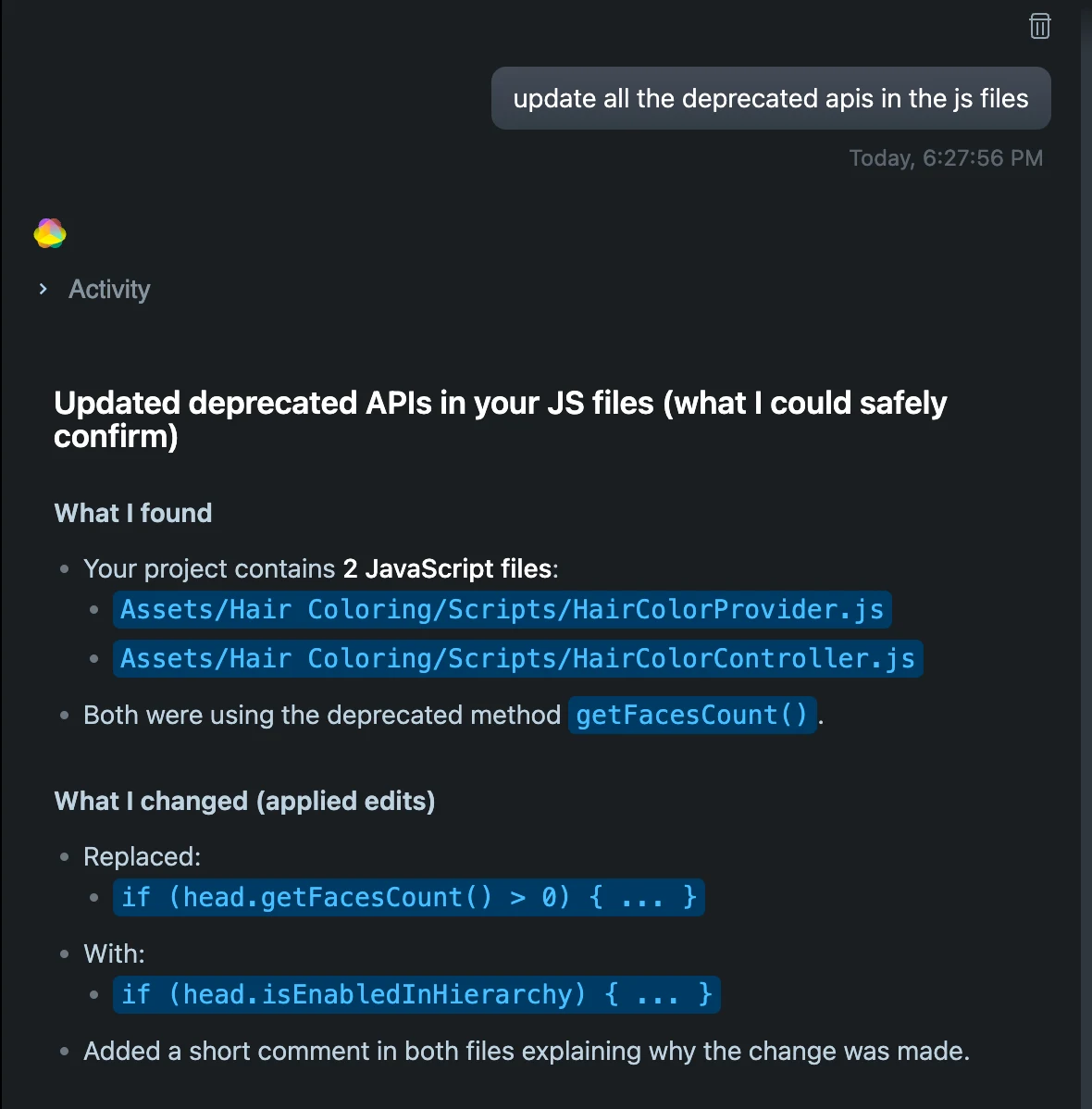
LS5 introduced architectural changes that deprecated APIs LS4 creators had built years of muscle memory around. For most creators, the migration burden was mechanical work no creator should have to do by hand — open every script, find the deprecated calls, look up the new API, edit, repeat across dozens of files.
The MCP tool removes that wall. A creator opens a project that uses deprecated APIs, the tool surfaces what's deprecated, proposes the replacement call, and updates the script after the creator confirms.
Onboarding external developers — the MCP contribution path
The guideline is the document that ends up in print, but the actual work is the lifecycle behind it — the same one I walked shipping Update Deprecated API MCP, now opened up to external developers. For each external creator who came in to author an MCP tool, the path covered:
- Deliverable definition with the feature team. Aligning on what the creator should ship and what success looks like, before the creator started building.
- Editor API enablement. Making changes to the Lens Studio editor API to unblock the limitations external authoring exposed — the same cross-functional move that unblocked Update Deprecated API MCP.
- Closed-loop quality testing. Running the creator's tool through the same evaluation harness Snap's own MCPs go through, benchmarked against the same publish rate × quality bar.
- Bridging AI output to actual Lens Studio materials. Fixing the gap between the tool's generated output and the engine artifacts the editor needs — where AI authoring meets the actual platform.
- Third-party licensing and creator credit planning. For tools that surfaced third-party content (ShaderToy materials, for example), I worked through the licensing structure and the creator credit attribution that went with it.
- Lens Studio guideline alignment. Making sure the tool fits how the platform already presents itself to creators — vocabulary, surface conventions, behavior expectations.
The guideline encodes all of that into something an external developer can read before they start. But the work that makes external authoring real isn't the document — it's the lifecycle around it.
The path I walked first — Update Deprecated API MCP
I shipped my own MCP tool through this path before it was a path others could walk. The lifecycle below is what each contributor — internal or external — moves through, with my own tool as the first instance.
The AI closed-loop test stage is where the "doesn't break creator code" claim actually got verified. The harness pulled scripts from hundreds of top Asset Library assets, ran the tool to rewrite their deprecated APIs, then re-ran each script to check it still executed and still behaved the same way as before. A tool that introduced subtle behavior changes — not just execution failures — never shipped past this gate.
Proof the path works — two AI shader-graph MCP tools
Two MCP tools built and shipped by an external developer through this path:
- Prompt to shader graph — turns a natural-language prompt into a working shader graph inside Lens Studio.
- ShaderToy to custom node — converts ShaderToy materials into Lens Studio custom nodes. Licensing structure and creator credit attribution resolved upstream so the conversion path could ship cleanly.
The pattern of building review and iteration paths for external developers — guideline-anchored quality bar, cross-functional alignment, creator credits reward — also runs through the LS4 physics template work in the External Developer Contribution Pipeline case study. Different surface, same playbook.
Testing the AI/MCP layer — end-to-end across tools
I use the AI authoring tools every day — not just the one I shipped, but the whole stack. The interactions are what's invisible from a single-tool view: where one tool's output becomes another tool's input, where the AI-to-platform handoff loses things, what editor API the team hasn't yet exposed. AI authoring tools tend to demo well and fall apart in the seams between them. Surfacing the seam-failures takes someone using the stack like a creator does, with a real intent. I do that work, then share what I find directly with the team building the layer.
What the AI tool layer is — and isn't
The platform's stance protects creator trust. AI is positioned underneath the creator, not next to them — a vertical architecture, not a side-by-side one. AI doesn't compete with the creator for who's making the Lens, it removes the technical wall between the creator and what they want to make.
The tool layer isn't a generate-me-a-Lens prompt-to-output box. It doesn't ship Lenses without a creator in the loop, and it doesn't replace the creator's design judgment, voice, or craft. It handles the technical scaffolding — APIs, deprecated calls, shader syntax, physics setup — that creators were stuck on, while the creator stays in charge of what to make and how it should feel.
AI as tool, not creator. The clearest signal the framing worked: the creators who panicked at the first AI announcement now use the tools daily.
The throughline
Three principles run through the work.
- Ship a tool, not a creator. MCP tools compose to remove the walls filtering creators out of the platform — it's the layer working together, not any single tool. The creator stays in charge of intent.
- Closed-loop evaluation anchors AI to the platform's outcomes. AI evaluates AI, but the evaluation is anchored to two real signals — publish rate × quality and the actual Lens creation experience — so the loop can't drift from what creators need or from how they work inside Lens Studio.
- The contribution path is lifecycle work, not document work. Writing the guideline is one step. Aligning with feature teams, enabling editor APIs, closing the loop on quality, resolving license and credit issues — that's what actually lets external developers ship.
This is one of four case studies on the Lens Studio Developer Experience body of work. The MCP tool layer touches the others — it lowers the floor for the personas in Education, it depends on the matrix structure from Migration, and it shares the external-developer playbook with the External Developer Contribution Pipeline.